Showing posts with label construction. Show all posts

Thursday, 30 January 2014

Journal - Digipak Advert Changes

After receiving feedback on my digipak advert, I made some changes to it. I increased the font and made it the same purple so that the song title also stands out, as opposed to just the album title and artist title. I also added a drop shadow and an outer glow to the date for the same effect. I cannot use my customised font for the date as including numbers is not an option therefore I used the Arial font.

However, I felt that this stood out too much and made the bottom half of the advert too crowded so I rearranged it to be below the artist's name. Then, I changed the colour to black to make it easier to read.


As my feedback said I needed more links to social networks, I added in a link to the record label website. As this wouldn't fit in the right hand corner, I placed it on the left, above the small album cover preview.


However,  I then felt that this was too crowded  on the left side so I moved the Polydor logo back to the right. 


Unhappy with the amount of text, I added in some more visuals (social networking logos that can be recognised universally) above the text links.

This is my final digipak advert. I am happy with the changes I made as I feel all of the information stands out, however the most important (artist title and album title) are the clearest.


Wednesday, 11 December 2013

Journal - Digipak Advert (Second Draft)

Here is the second draft of digipak advert. I adjusted the font for my smaller text and changed the colour of my album title so that it was clearer to read, like my feedback stated. Changing the font of my smaller text meant that I could now include numbers (my previous font was not available for numbers and symbols, only letters) so I changed my text to read "#1" as the success of a single will encourage people to buy the album and is commonly used when marketing digipaks and adverts.

I also added the date for the upcoming album.

I am happy with my digipak advert; I think that using one bold photo means that it is simple yet the faded palm tree background and lens flares provide artistic elements. I also think that, as a marketing tool, it is also effective as it references different media platforms and advertises my artist.


Wednesday, 4 December 2013

Journal - Digipak Advert (First Draft)


This is the advertisement for my digipak. Through analysing other digipak adverts, I learnt the codes and conventions of an advert -- they mostly consist of the album cover [if not a photo from the album shoot] paired with the artist's name that takes up most of the focus.  

I decided to use a different photo of Isla, as opposed to the one used on the album cover, because the positioning of it in the middle looks better than the other one. I edited the contrast of the photo so that the white background had a pinkish tint to it but I also added in the palm tree background from my album cover, but turned the opacity down so that it is faint.

I added in the Polydor logo and a link to Isla's website to show the influence of the record label and market my artist across different media platforms. To help market the album, I included the 'success' of a single on the poster. As most of the digipaks I analysized featured the actual album cover, I added mine in at the bottom right corner.

After presenting this to my teacher -- whilst she felt that it communicated both the genre of our artist and conventions of an advert -- a point that she made was the typography of the small text. She felt that it didn't read as clear as it could be, so in my second draft I will use a clearer font. We also surmised that the 'Indigo' text should be in white in order for it to stand out against the purple background.

Journal - Digipak Template

Here is my full digipak template following the changes I have made after feedback:


I am happy with this draft of my digipak. I feel like I have taken into consideration the feedback I was given (like changing the font) but most notably taking the background out of one of my inside panels.

Whilst the sample of my target audience felt that this photo from my first draft template communicated the importance of fashion in my image very well, they agreed that the background didn't fit in with the rest of the photoshoot as there were no purple elements and it gave it almost an urban feel.

In order to resolve this, I cropped the background out of the photos and replaced it with my palm tree background. However, this looked empty and unfinished as the background took up too much of the panel. There were several photos that we had taken that I hadn't used so I used this photo of Isla's hair, again adjusting the opacity so it looked almost faded into the background. There was still a gap in the corner, so I filled this with another photo of Isla with a a Diana F camera. This completed this panel.


For practical reasons, I also made a copy of my digipak with the upper panels upside down.


Journal - Poll Results

I sent a online poll to several members of my target audience (male and female) to see their feedback.

The majority of votes preferred the mirror effect cover, including myself, and so this is the album cover that I have decided to go with. The mirroring effect is commonly used for indie-pop female artists and so I think this suits my artist more.


My previous design of a collage, however, I think is quite artistic and still presents the indie genre so I plan to experiment with using it for another panel, with or without the white lines.

Journal - Digipak Spine

I wanted the spine of my digipak to be simple and to link in specifically with the album cover so I used the same background. I selected the area of the background that had the most lens flare on it.

I used the spine as an opportunity to print my logo onto my digipak. I changed my logo so that it was transparent as the floral background (or any type of background) would clash with my palm tree background.

White was the easiest colour to read, so I used that as the font colour. I tried out the gradient effect again on both my text and logo but this just made it more difficult to read.

To make my typography and logo stand out more, I added a drop shadow.

Tuesday, 3 December 2013

Journal - Poll

As I couldn't decide which draft of my album cover was the most suitable, I devised a poll that I will present to samples of my target audience for their feedback.

This is the link to my online poll:

Below are the three options for my album cover:

Option 1: A collage style front cover with thinner/straighter lines 


Option 2 - A collage style front cover with thicker/diagonal lines


Option 3 -  mirror effect album cover [option 3]


Journal - Final Album Cover Decisions

Below is a printscreen of another draft of my album cover. I added in the polaroid frame stencil to give my digipak a more alternative feel, as my feedback said that some elements of my digipak were too pop and didn't communicate the indie element of our genre. I previously used a polaroid stencil on another panel for my digipak but kept the background black, where is here I made the inside of the polaroid transparent. I think this is more effective than a black background because it gives the panel more colour and makes it more eyecatching.

Whilst I like the use of the polaroid stencil, I do not think that it fits for the album cover. However, it is important that my digipak does have an artistic/indie element so I plan to experiment with this stencil for another panel of my digipak.


So far, I have constructed three drafts of my album cover. It has been helpful to experiment with my photos and tools on photoshop so I can visually judge what works and take elements away for other panels. After reviewing all my album cover drafts, I have narrowed my final choice down to two.

Final Album Cover (Draft 1)


Using a mirroring effect was a tool that I had never previously used on photoshop so this process has provided me with a new skill. After analyzing a Florence and the Machine digipak where this effect was used and finding more on the internet, I decided to experiment with this effect myself.

I really like how my mirroring effect looks; I feel it provides an artistic vibe and helps lean my digipak more towards the indie genre, as opposed to just pop. It also allows Isla to be the main focus of the cover with the background secondary.


Final Album Cover (Draft 2)


However, I also like the use of multiple photos separated with white lines on my original design so I decided to revisit it. Using the same photos, I changed the positioning and width of the lines to make it look neater. The photo in which Isla's hair is fanned around her has been difficult to edit; there are several gaps that I am still currently disposing off using the Magic Eraser tool on Photoshop. I made another draft of this album cover where I kept the photo at it's usual size and left the background in, but felt this defeated the purpose of my background.


Monday, 2 December 2013

Journal - Digipak CD

Though my previous draft for my disc involved a galaxy background a floral logo, I decided to change this to make my digipak less feminine. I designed my CD before deciding on a purple theme for my digipak, so my original designs do not go with my digipak as a whole.

As a digipak needs to have additional features as a selling point, my digipak will have two CD's: the first being a music CD and the second a DVD with exclusive behind-the-scenes footage of Isla on tour and filming her music videos. This additional CD will be in a pull out style case: instead of the usual plastic case, this CD will be underneath a paper flap [that will be a printed photo of Isla] that buyers will have to slide out.

For my first draft, I wanted to keep the design simple and so I stayed away from using a loud background. Experimenting with photoshop allowed me to discover the gradient tool (where text or a background can change colour as it goes down or up) and I used this on a blank CD template. I comtemplated having the design for my additional CD the same gradient effect -- though with the colour gradient in reverse -- but after trying out these designs with the rest of my digipak, I decided using the same background from my front cover would look better.


I adjusted the opacity of the panel behind the CD to see what it would look like.

Whilst I really liked my long exposure photos and received positive feedback on them, I personally felt as if the white lighting meant that they stuck out slightly in my all purple digipak. I adjusted the saturation levels to get a purple hue and will use this photo for the panel behind my first CD. I used the my chosen Harbell Script font (taken from dafont.coom) as the font for the CD number and my album/artist name.


I combined both of these backgrounds, changing the opacity on my palm tree background on Photoshop so that they were faded into the background with the gradient effect still present. This resulted in my background looking brighter and I decided to use this design as my final CD.

Again, I adjusted the opacity of the CD once I put it together with the long exposure panel.


I used the same design for both designs but to indicate that my additional CD will have to be pulled out, I placed it more to the side of the image.


Thursday, 28 November 2013

Journal - Fourth Draft of Album Cover

Though I like the purple palm tree background and am confident that I will use is throughout my digipak, I experimented with a galaxy wallpaper as the background. I want to use purple as the colour throughout my digipak so that it all links together, however this also means that my photos look very feminine.


Though my target audience are primarily female, it is important that it is not completely gender biased.

After applying this galaxy background, I have decided to keep using the palm tree background. I plan to manipulate the background more, as opposed to just the lens flare effect, by playing around with the contrast and saturation to see if I can make it less feminine.


Journal - Third Draft of Album Cover

After a one to one with my teacher, we decided it was too girly and didn't reflect the indie element of our genre as much as it did the pop genre. I tried to resolve this by limiting the purple on there to just the background and the costume, instead using white for additional colour. I also added in a frame on photoshop and changed the font to the one below, as my feedback stated my current font (Art Brewery) was too difficult to read. After experimenting with a different style font, I have reached the conclusion that I still want to use a calligraphy/hand-written font because it gives it a personal feel.


However, I do not like how this looks as I think it looks too boring and it left no space for the album title. I used a different photo on this album cover also and like how that looks in the middle of the cover, but still think that this album cover looks too pop and not alternative enough.


Sunday, 24 November 2013

Journal - Digipak Fonts

Following feedback that my current font (Art Brewery) was too difficult to read, I went back on to dafont to look at some more calligraphy fonts.

I thought that this font was clearer and had a calligraphic element to it, but ultimately felt the tattoo connotations wouldn't fit in with my indie-pop genre.


I thought this was quite a girly font and again liked the handwritten element to it because it provides a personal feel, however I think it could also be difficult to read if used for the entire tracklisting.


Harbell is the font that I decided to use. The boldness of it means that it is clear to read, whilst still keeping the calligraphic element that I wanted.


Here is my tracklisting with my new font -- I also adjusted the positioning of it against Isla's hair and made it thicker. I used the gradient tool effect on my text so that it changes colour as it goes down.


Thursday, 21 November 2013

Journal - Presenting Our Digipak


I presented the first draft of my digipak to my class. In general, they responded to my ideas positively and agreed with the points I wanted to improve on. They felt that my use of the colour purple communicated my genre and ensured that my images related due to the colour scheme. Each feedback sheet suggested that I use a different font on my tracklisting as it is difficult to read whilst my teacher suggested that my fourth panel may need more editing or a completely new background as it stands out from the rest of my panels. Overall, I am happy with my feedback.


Wednesday, 20 November 2013

Journal - Second Draft of Album Cover

After seeing this fanmade album cover on the internet, I decided to experiment with my photos to recreate something similar. I had already included a palm tree background in my previous design, but decided to use a different photo and a brighter colour scheme. I also didn't want to cover up my artist's eyes or face, as it is the main selling point for a female artist -- especially for the album cover.

I added an inner glow of the photo of Isla to giving it a more artistic effect and instead made her name in the newspaper text, and the album title secondary. I like how this looks, but am undecided on whether the use of the newspaper style font reflects my genre. I think the inner glow effect on the photo looks good and may experiment with this effect on the rest of my photos.


Wednesday, 13 November 2013

Journal - Digipak Design (First Draft)


I made a presentation for when we have to pitch the first draft of our digipak design to the class. I put the photos that I edited and the ones I plan to edit together in the template to communicate a brief idea of my final product. I am happy with how it looks because I think it links together however am concerned that the photo outside stands out, but I plan to re-edit this so it fits in with the purple theme.

I added a lens flare to all of my photos so that they link together.

My album cover needs to be improved as the edges aren't neat but I like how the photos go with the background; my final product will definitely resemble this draft.

The photo I want to use for tracklisting and the photos for behind the individual CD's are currently unedited however I will give them more of a purple hue and merge my long exposure photos together. My tracklisting will be quite simple, with a photo of Isla positioned on the right and the tracklisting going down the left.

The second panel for my digipak is the one I edited most, because of the double effect. I like how it turned out, but I think it stands out from the rest of my photos. In an attempt to rectify this, I added the same lens flare effect that the rest of the photos have but I think it's the location of the shoot that is making it stand out. Hopefully I can edit the photo to fit in with the colour scheme as this photo demonstrates the elements of fashion in Isla's image.

I wanted my digipak to have a personal element and I think my 3rd digipak panel does this with the polaroid stencil. It also gives a artistic, vintage feel because of the flower crown and Diana F camera.


Sunday, 10 November 2013

Journal - Digipak Cover

After deciding against a mirror effect image as my digipak cover, I began researching other album covers and experimenting using my own photos through photoshop.

We had some photos from the photoshoot that we had decided not to use, but I revisited these to see if I could incorporate them into my digipak cover. We took a range of close-ups and I added the lens flare effect and our logo into a few of them to see if I could use them as an album cover. This led me to decide that using one photo as my digipak pack was too boring for me. As I did not like the mirror effect either, I began researching album covers that had multiple photos on them and used the ones below as inspiration.


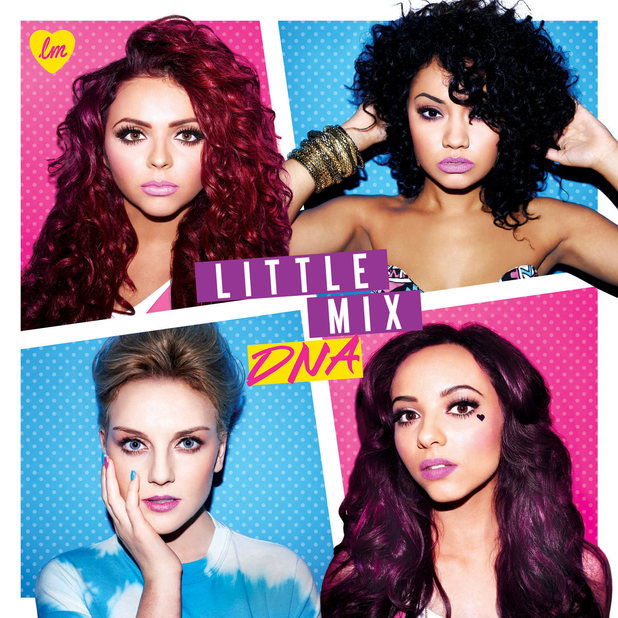
I liked the artistic indie element of the Lana Del Rey cover but felt it was quite boring, whilst the Little Mix coer was too bright and pop. I particularly liked the use of the white lines separating the different images on the Little Mix album cover and decided to use that on my own image.

I began researching backgrounds that I could use as a minor part in my album cover. My digipak will have a purple theme, so I looked at purple galaxy themes but eventually found a palm tree wallpaper that I liked.

I used the stencil effect on Photoshop to create my own white lines, though struggled with the thickness and straightness of the lines. As this is a first draft, I plan to tidy up the lines if my cover is received positively by the class when we present it.

I chose this close-up for my album cover because I thought it was the best out of the other close-ups we took and I used the Diana F photo because I liked how the hair fanned out all around it and felt it fit in well with my structure. I used the magnetic lasso tool and the clonestamp to bring these photos in, though still need to tidy up the edges.